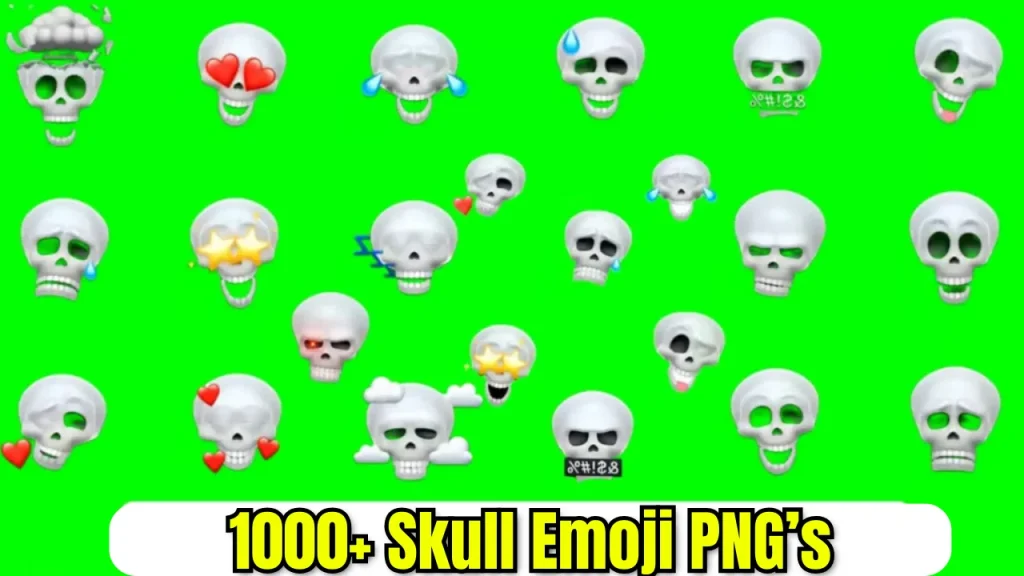

Skull Face Emoji Pack Free Download – JamalEditz

So friends, let’s talk about one of the most trending emoji styles out there right now — the Skull Face Emoji. Look, you and I both know that editing videos or photos isn’t just about fancy filters anymore. These days, small creative details like emojis can completely change the vibe of your edit. And right now, nothing is getting more attention than these cool, quirky, and even savage skull face emojis.
I’ve noticed so many creators, whether on Instagram, TikTok, or YouTube Shorts, adding these emojis to give their edits that extra punch. But here’s the thing — finding high-quality, downloadable skull face emojis with transparent background or green screen options isn’t as easy as you’d think. That’s why I decided to put together this free pack for you guys.
You don’t have to go hunting all over the internet anymore, and you certainly don’t have to settle for low-quality or blurry images. On this page at JamalEditz, you can download skull face emoji transparent PNGs, HD versions, even green, blue, or black screen variants — all neatly packed and ready to use in your edits.
Skull Face Emoji Trend
Loo, it’s no secret that trends on social media change super fast. Just a couple of months back everyone was using crying face emojis for their relatable memes and edits, but now the skull face emoji has completely taken over. Why? Because it perfectly fits those savage, funny, or dark humor vibes that people are loving right now. When you slap a skull face emoji on your clip, it screams sarcasm, deadpan humor, or just that iconic “I’m dead” reaction everyone’s looking for.

Big creators already have graphic designers or access to premium emoji packs — but small creators? They often don’t. That’s why these packs help you stand out even if you’re just starting out. And trust me friends, once you start using high-quality skull face emoji transparent backgrounds in your edits, you’ll instantly feel your content looks more professional and attention-grabbing.
Download Skull Face Emoji Pack
Now you might be wondering what exactly you get here. So, friends, let me break it down. I’ve included several variations of the skull face emoji, so you can use them however you want depending on your editing style. For example:
- — Skull face emoji with transparent background PNG files — perfect if you’re overlaying on videos or photos.
- — Skull face emoji green screen — for those who prefer chroma key editing.
- — Skull face emoji blue screen — another option if you like to key out blue instead.
- — Skull face emoji black screen — looks amazing in certain dark theme edits.
- — Skull face emoji HD — super sharp quality so your edit doesn’t look pixelated.
All these are in high resolution and ready to download — no ads, no watermarks, no gimmicks.

How To Use Skull Face Emoji In Your Edits
Okay friends, now let me guide you a little on how to actually use these emojis once you download them. Honestly, it’s super simple — even if you’ve never done this before. All you need is your favorite editing app — could be CapCut, VN, Alight Motion, or even Premiere Pro.
So, here’s how I usually do it. First, I pick the clip where I want to add that funny or savage reaction. Then I import the skull face emoji transparent PNG into the timeline as an overlay. You can adjust its size, position it anywhere you like on the screen, and even add some cool effects to it like shake, bounce, or glow. If you’re using the green screen or blue screen versions, just key out the color and place the emoji wherever it fits best.
I’ve even seen some creative editors animate the emoji — making it grow, shrink, or rotate at just the right moment to emphasize a joke or punchline. So yeah, you can get really creative with it.
Use High-Quality Skull Face Emojis
Here’s the thing friends — low-quality emojis can literally ruin your edit. They look blurry, pixelated, and completely unprofessional. And if you’re trying to build a following or even just impress your friends, you can’t afford to use such bad graphics. That’s why I’m giving you this HD-quality skull face emoji download pack here on JamalEditz. Every file is clean, crisp, and ready to make your edits pop.
You’ll also save a ton of time. Instead of screenshotting random emojis from somewhere and then painfully removing backgrounds yourself, just grab the transparent background version from here and you’re good to go. Simple, fast, and professional.
The Trendy Editing Idea You Can Try
Now that you’ve got your skull face emojis, let me share a quick trending edit idea with you. Right now, creators are making short clips where they highlight a fail or a savage comeback moment by throwing a skull face emoji over the scene with a little shake or glitch effect. It’s hilarious, super relatable, and gets tons of engagement. You can try it in your next Reel or Short — trust me, your viewers are going to love it.
Download Your Skull Face Emoji Pack Now
So friends, now that you know how cool and versatile this pack is, what are you waiting for? Scroll above to the download button and grab your skull face emoji transparent PNGs, HD files, and green, blue, black screen versions right now. No signup required, no hidden charges — it’s completely free because I want to help you level up your edits without spending a single penny.
And don’t forget to tell me in the comments how you used them and what kind of edit you made. I’d love to see your creativity shine.
Final Words
So friends, here’s the bottom line — whether you’re making funny memes, reaction edits, or savage comebacks, the skull face emoji is your perfect companion. And thanks to this free downloadable pack, you’ll never have to worry about low-quality graphics again. Just download, add, and watch your edits stand out. Keep creating, keep shining, and stay tuned to JamalEditz for more free packs and editing tips. See you in the next one.
Related Posts
-
Blue Sigma Emojis Pack Free Download – JamalEditz
So friends, today we’re talking about something really cool and trending in the editing world — the Blue Sigma Emojis Pack. If you’ve been editing for even a short while, you already know that small design elements…
-
1000+ Skull Emoji Pack Free Download
So yeah, skull lovers! My self Jamal Editz, and today, I’m super excited to share something awesome with you: Skull Emoji Pack Free! If you’re someone who loves to add that edgy, cool vibe to your video…